What Is a CRM Dialer and How Does It Work?
A CRM dialer helps sales and customer support teams make calls directly from their customer relationship management (CRM) workflow. Instead of manually copying phone numbers, switching between tools, and updating call details afterward, a CRM dialer connects calling activity with customer records.
With CRM calling, representatives can access customer information, start calls, and keep relevant call activity connected to the right contact or lead. Features such as click-to-call, automatic call logging, call history, and CRM data synchronization can reduce repetitive work and help teams maintain more complete customer records.
In this guide, we’ll explain what a CRM dialer is, how it works, how it differs from traditional dialing, and what businesses should look for when choosing CRM dialer software.
What Is a CRM Dialer?
A CRM dialer is a calling solution that connects a business phone system or dialer with a customer relationship management (CRM) platform. It allows sales and support teams to make calls while keeping relevant call activity connected to the correct contact, lead, or customer record.
Depending on the CRM and calling solution, a CRM dialer may support features such as:
- Click-to-call from CRM records
- Automatic call logging
- Call history
- Call notes and outcomes
- Contact and customer data synchronization
- Call recordings
- Call analytics and reporting
- Follow-up workflows
The basic idea is:
CRM data → Call → Call activity → Customer record
This creates a more connected workflow between customer information and business communication.
How Does a CRM Dialer Work?
A CRM dialer connects your CRM with a business calling system so representatives can manage calls while keeping customer information and call activity connected.
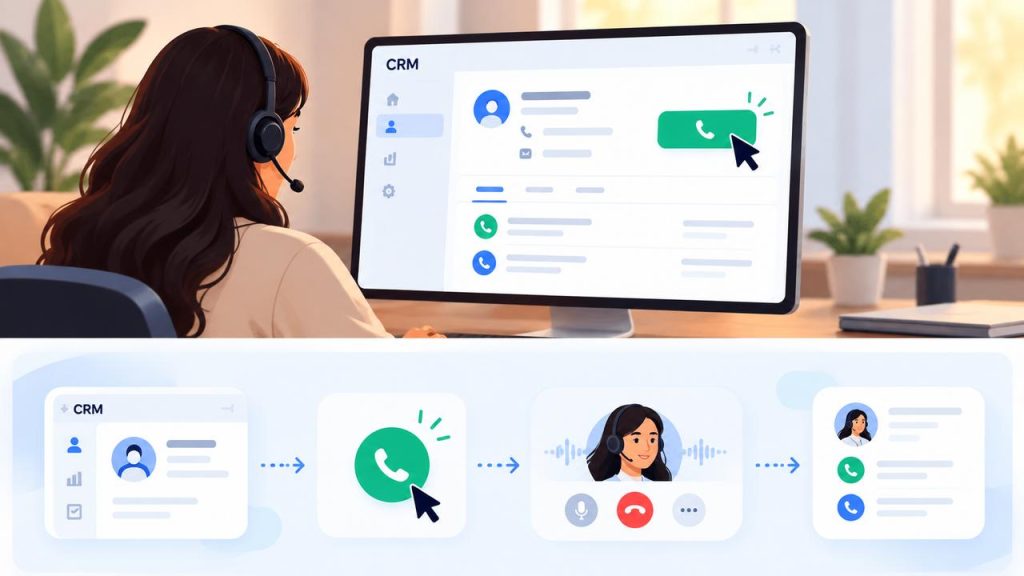
How a CRM dialer connects customer records with calling activity.
1. Connect the CRM and Calling System
The first step is connecting the CRM with a compatible calling platform. Depending on the systems involved, this may use a native integration, API, or another supported connection method.
2. Open a Customer or Lead Record
The representative opens a contact, lead, or customer record in the CRM. They can review available information such as the phone number, previous interactions, notes, and account details before making the call.
3. Start the Call With Click-to-Call
With click-to-call functionality, the representative can select a phone number directly from the CRM instead of manually copying and entering it into a separate phone application.
4. Handle the Conversation
The representative handles the call while referring to the customer information available in the CRM. This gives them relevant context during the conversation.
5. Log the Call Activity
After the call, details such as call direction, duration, outcome, notes, or recordings may be added to the relevant CRM record, depending on the integration.
This process is commonly known as CRM call logging.
6. Continue With the Next Action
After the call, the representative can update the customer record, add notes, schedule a follow-up, or move to the next lead. This keeps calling activity connected with the broader sales or support workflow.
CRM Dialer vs. Traditional Dialing
Traditional dialing often requires representatives to switch between the CRM and a separate phone application. They may need to find a customer’s phone number, copy it, make the call, and then return to the CRM to record what happened.
A CRM dialer connects these activities into a streamlined workflow.
| Traditional/Manual Dialing | CRM Dialer |
| Phone numbers may be entered manually | Click-to-call can start calls from CRM records |
| CRM and phone system may be separate | CRM and calling system are connected |
| Call details may require manual entry | Call activity can be logged automatically |
| Representatives may switch between tools | Calling can happen within the CRM workflow |
| Customer context may require extra searching | Relevant CRM information is available alongside the call |
| Follow-up information may be recorded separately | Call outcomes can be connected to customer records |
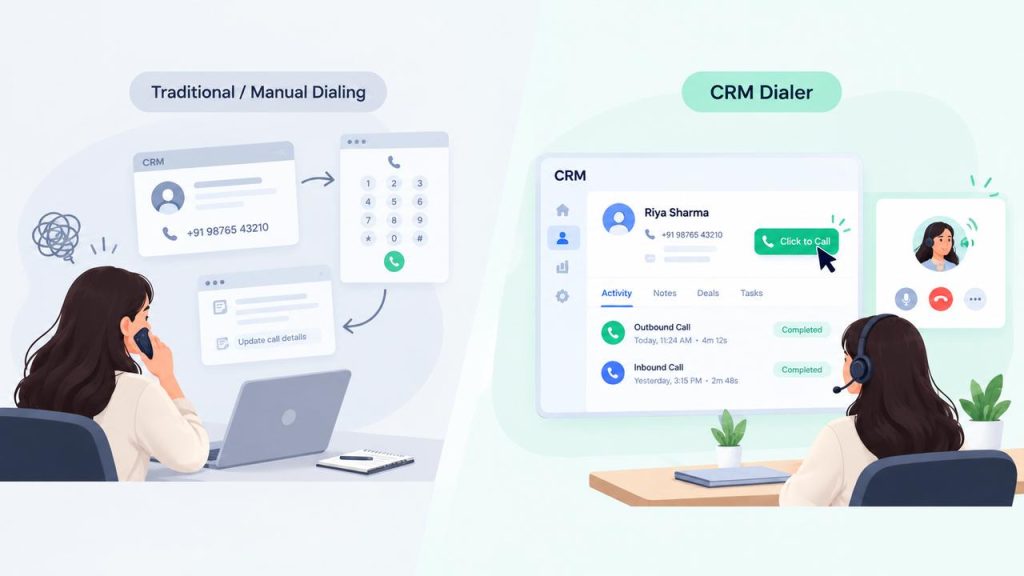
The exact features available depend on the CRM and calling platform being used.
What Are the Benefits of Using a CRM Dialer?
A CRM dialer can help sales and customer support teams reduce repetitive calling tasks while keeping communication activity connected to customer records.
1. Faster Calling Workflows
Click-to-call reduces the need to manually copy and enter phone numbers, allowing representatives to start calls directly from CRM records.
2. Less Manual Data Entry
Automatic call logging can reduce the amount of information representatives need to enter manually after every conversation.
3. Better Customer Context
Representatives can access relevant CRM information before and during calls, helping them understand previous interactions and customer history.
4. More Complete Call History
When calling activity is connected to CRM records, teams can maintain a clearer history of customer conversations and follow-ups.
5. Easier Lead Follow-Ups
Sales teams can use CRM calling workflows to contact leads, record outcomes, and keep follow-up activities connected to the appropriate records.
6. Improved Team Visibility
Managers can use available call data and reporting to understand calling activity, monitor workflows, and identify areas where teams may need support.
7. Fewer Tool Switches
Connecting the CRM and calling system can reduce the need to move repeatedly between separate applications, creating a more streamlined workflow.
How Does a CRM Dialer Connect Calling With Customer Records?
A major advantage of CRM dialer software is that calling activity can remain connected to the customer or lead record.
Instead of treating phone calls as separate activities, the CRM can associate relevant call information with the contact or account.
Contact Information
The representative can access the customer’s phone number and other available CRM information before starting the call.
Call History
Previous calls and interactions can provide context for the next conversation. This helps representatives understand what has already been discussed with the customer.
Automatic Call Logging
Depending on the integration, call details such as call time, duration, direction, and outcome can be recorded against the relevant CRM record.
Call Notes and Outcomes
Representatives can record important information from the conversation, such as customer requirements, objections, or the next follow-up action.
Data Synchronization
A CRM phone integration can synchronize relevant information between the calling platform and CRM. The exact data synchronized depends on the specific CRM and integration.
The result is a more connected CRM calling workflow where customer information and communication history stay together.
CRM Dialer Features to Look For
When evaluating CRM dialer software, businesses should consider features that make calling easier while keeping customer communication connected to CRM data.
Click-to-Call
Representatives can start a call by clicking a phone number within the CRM instead of manually entering the number.
Automatic Call Logging
The system can automatically record relevant call activity in the CRM, reducing manual data entry.
Call History
A centralized call history helps representatives and managers review previous customer conversations and calling activity.
CRM Data Synchronization
The calling platform and CRM can exchange relevant customer and call information, depending on the integration.
Call Notes and Outcomes
Representatives can record notes, call outcomes, and follow-up information after conversations.
Call Analytics
Calling data can help teams understand activity levels, call patterns, and other available performance metrics.
Call Recording
Where supported and legally permitted, call recording can help teams review conversations, train representatives, and maintain a record of customer interactions.
Contact and Lead Management
A useful CRM calling workflow should make it easy for representatives to identify contacts, leads, and customers and take the appropriate calling action.
CRM Dialer Use Cases
A CRM dialer can support different teams and workflows where phone communication needs to stay connected with customer information.
Sales Calls
Sales representatives can call leads directly from CRM records, review customer information before the conversation, and record call outcomes for future follow-ups.
Lead Follow-Ups
Sales teams can use CRM calling to follow up with new leads, previous prospects, or contacts who have shown interest in a product or service.
Customer Support
Support teams can use connected calling workflows to access customer records and review previous interactions before or during a conversation.
Outbound Calling
For teams handling regular outbound calls, a CRM dialer can help representatives work through contact lists while keeping calling activity connected to CRM records.
Account Management
Account managers can use CRM calling to stay connected with existing customers while maintaining a history of relevant conversations and follow-up actions.
Customer Re-Engagement
Businesses can contact inactive customers or older leads while using existing CRM information to understand previous interactions and determine the appropriate next step.
CRM Dialer vs. Traditional Business Phone System
A CRM dialer and a traditional business phone system both support business calling, but they serve different workflows.
A traditional business phone system is primarily designed to provide calling capabilities such as inbound and outbound calls, extensions, call routing, and other communication features.
A CRM dialer focuses more specifically on connecting those calls with customer and sales data.
Traditional Business Phone System
A traditional business phone system can help businesses:
- Make and receive calls
- Manage extensions and users
- Route incoming calls
- Handle business communications
- Manage basic call activity
However, customer information and call activity may remain separate from the CRM unless an integration is configured.
CRM Dialer
A CRM dialer connects calling activity with CRM records and can support workflows such as:
- Click-to-call
- CRM call logging
- Customer call history
- Contact information access
- Call notes and outcomes
- CRM data synchronization
The key difference is context. A traditional phone system primarily manages communication, while a CRM dialer connects communication with customer and sales information.
For teams that rely heavily on CRM data for sales, support, or follow-ups, this connected workflow can reduce unnecessary switching between tools.
How Does CRM Calling Improve Sales and Support Workflows?
A CRM dialer can make calling workflows more organized by connecting phone conversations with customer information already managed in the CRM.
Faster Access to Customer Information
Representatives can access relevant contact details and previous interactions without searching through multiple systems before every call.
More Consistent Call Records
When call activity is logged in the CRM, teams can maintain a more consistent record of customer conversations and outcomes.
Easier Follow-Ups
Call notes, outcomes, and customer history can help representatives understand what needs to happen next, whether that means another call, a demo, or a support action.
Better Team Coordination
When relevant call information is available in shared CRM records, different team members can understand previous interactions before contacting the same customer.
Reduced Administrative Work
Click-to-call and automated call logging can reduce repetitive tasks associated with manually dialing numbers and recording call activity.
Overall, a CRM calling workflow helps bring communication and customer data into the same process, allowing teams to spend less time managing separate tools and more time interacting with customers.
Best Practices for Using a CRM Dialer
To get the most value from a CRM dialer, businesses should focus on keeping calling workflows organized and customer data accurate.
Keep CRM Data Updated
Make sure contact details, phone numbers, lead status, and other relevant customer information are kept accurate.
Use Clear Call Outcomes
Define consistent outcomes such as connected, no answer, callback requested, or follow-up required. This makes call records easier for teams to understand.
Add Useful Call Notes
Encourage representatives to record important information from conversations rather than relying only on memory.
Review Call Activity Regularly
Managers can review available call history and analytics to identify workflow issues and understand how teams are using the calling system.
Maintain Follow-Up Processes
A completed call should lead to the appropriate next action when required. Connect call outcomes with follow-up tasks so leads and customers do not get overlooked.
Choose Integrations Carefully
Before selecting CRM calling software, confirm that it supports the CRM your team uses and provides the data synchronization and calling capabilities required for your workflow.
Frequently Asked Questions About CRM Dialers
What is a CRM dialer?
A CRM dialer is a calling solution that connects a business phone system with a CRM, allowing teams to make calls while keeping call activity connected to customer, lead, or contact records.
What is CRM calling?
CRM calling refers to making and managing business calls as part of a CRM workflow. Depending on the integration, it can include click-to-call, call logging, call history, and customer data synchronization.
What is click-to-call in a CRM?
Click-to-call allows a representative to start a call by selecting a phone number directly from a CRM record instead of manually entering the number into a separate phone application.
Can a CRM dialer automatically log calls?
Many CRM dialer integrations can automatically log relevant call information, such as call time, duration, direction, or outcome. The exact capabilities depend on the CRM and calling platform.
What is the difference between a CRM dialer and a sales dialer?
A CRM dialer focuses on connecting calling activity with CRM records and customer data. A sales dialer is generally focused on helping sales teams make outbound calls efficiently. Some solutions can serve both purposes.
Do CRM dialers work with every CRM?
No. CRM dialer functionality depends on the specific integration available between the calling platform and CRM. Businesses should check supported CRM platforms and available features before choosing a solution.
Is a CRM dialer useful for customer support teams?
Yes. A CRM dialer can help support teams access customer information, review previous interactions, log calls, and maintain a connected history of customer communication, depending on the integration.
Conclusion
A CRM dialer connects business calling with the customer information teams already manage in their CRM. By bringing calling, customer records, call history, and related activity into a connected workflow, it can reduce repetitive tasks and make customer communication easier to manage.
Features such as click-to-call, automatic call logging, call history, and CRM data synchronization can help sales and support teams maintain better context around customer conversations.
When evaluating CRM dialer software, businesses should consider their CRM platform, calling requirements, integration capabilities, data synchronization, reporting, and the workflows their teams use every day.