DialNext GoHighLevel Integration: Setup Guide
The DialNext GoHighLevel integration helps businesses connect their communication workflows with customer relationship management. DialNext offers business calling, dialer, voice, SMS, and WhatsApp solutions to support customer interactions.
By connecting DialNext with GoHighLevel, businesses can work toward streamlining communication, organizing customer information, and reducing manual work. The available features depend on the supported integration capabilities.
How to Integrate DialNext with GoHighLevel
1. Log in or sign up to your DialNext account.
2. In the left sidebar, click Integrations.
3. Find GoHighLevel in the integrations list and click Integrate.
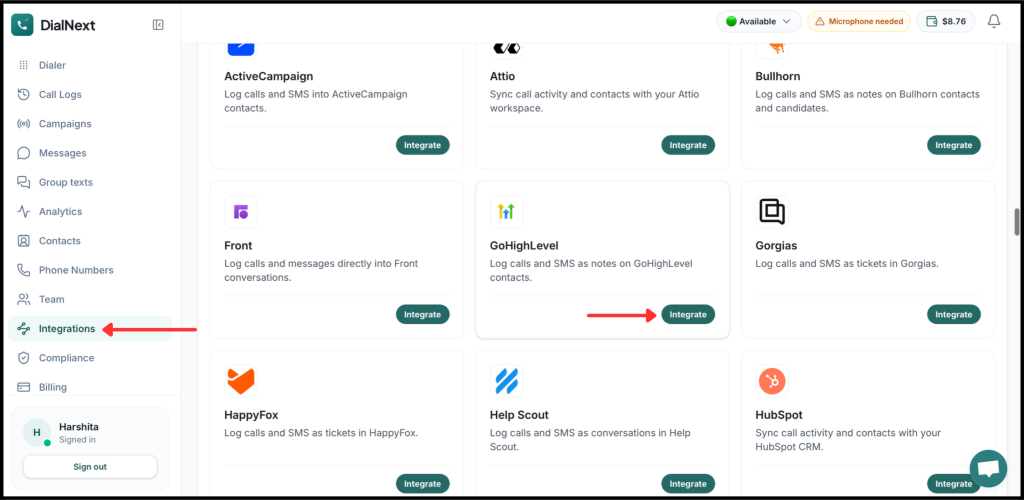
4. Authorize the connection between DialNext and GoHighLevel.
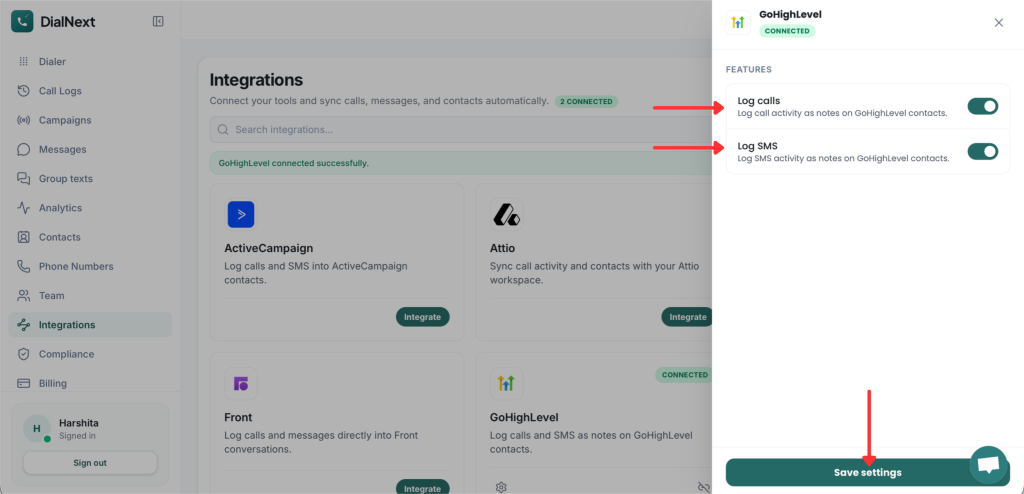
5. Choose the features you want to enable.
6. Click Save settings to complete the integration.
7. Make a test call or send an SMS from DialNext to verify that the activity is logged in GoHighLevel.
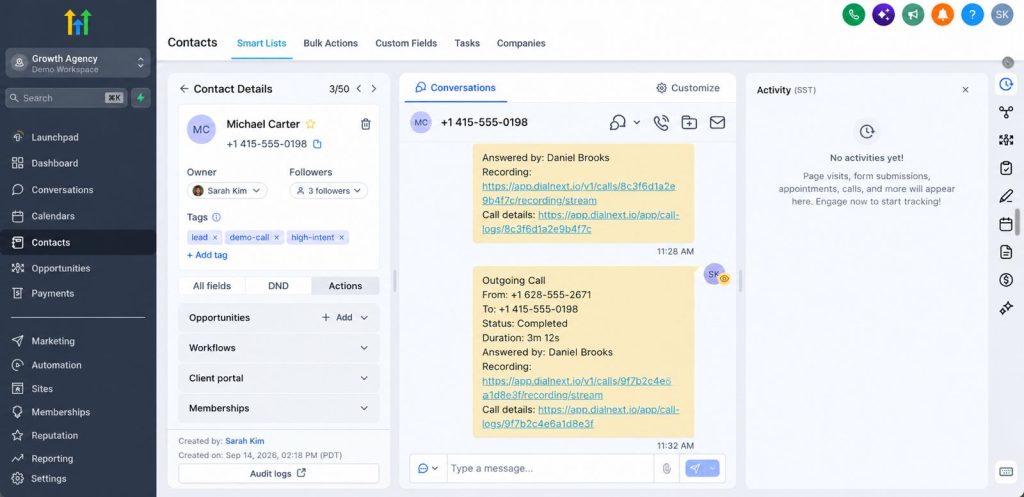
8. Your DialNext account is now connected to GoHighLevel. Verify that the supported call and SMS activities appear in the relevant contact records.
What does the DialNext GoHighLevel integration do?
The integration connects DialNext with GoHighLevel to help businesses manage customer communication and CRM workflows more efficiently. It aims to reduce manual work and keep customer interactions organized.
- Business calling: Support calling workflows through DialNext.
- Call activity logging: Review call records in GoHighLevel, if supported by the integration.
- SMS integration: Manage SMS communication through the supported workflow.
- Customer communication: Keep relevant customer information organized for easier follow-ups.
Note: Confirm each feature against the actual integration before publishing these capabilities as available.
How to use the integration
After completing the DialNext GoHighLevel integration, ensure the supported features are enabled in the integration settings. Once you save the settings, test the connection to confirm that the configured communication workflows are working correctly.
You can also explore our DialNext Intercom Integration guide to learn more about connecting DialNext with another customer communication platform.
Frequently Asked Questions
1. How do I connect DialNext with GoHighLevel?
Log in to DialNext, open Integrations, and look for GoHighLevel. If the integration is available, follow the on-screen instructions to authorize and configure the connection.
2. Which features does the integration support?
Supported features depend on the implemented integration. Confirm calling, SMS, and other communication capabilities before enabling them.
3. Will calls automatically appear in GoHighLevel?
Automatic call logging must be verified by placing a test call and checking the relevant contact record.
4. Do SMS messages sync automatically with GoHighLevel?
SMS syncing depends on the implemented integration. Send a test message and check the relevant conversation record to confirm the behavior.
In conclusion, the DialNext GoHighLevel integration aims to help businesses streamline customer communication and organize their CRM workflows. Visit DialNext to learn more about its business communication solutions and integrations.